

Current version: 2026.11.15
PortIgniter LMS is a small, fast, self-hosted learning management system for trainers and small training teams. Build courses in a drag-and-drop builder, mix written lessons, video, and code with quizzes and timed tests, issue verifiable certificates, and sell your courses, workbooks, bundles, and memberships through Stripe, with scheduled sales that start and stop on their own. It all runs on your own server as a handful of Docker containers, with no per-learner fees and no LMS administrator required.
Most educators face a frustrating choice: open-source platforms like Moodle or Chamilo that are a nightmare to set up and maintain, or enterprise platforms with six-figure price tags. PortIgniter LMS sits in between. It is opinionated where it should be, every setting has to earn its place, and course settings fit on one screen. The goal is simple: under 15 minutes from docker compose up to a published course.
Learners get the same treatment. They are never more than two clicks from login to the exact lesson they left off on.
The LMS runs anywhere Docker with Docker Compose runs. Your learners only need a web browser.
 Linux serverRecommended host for production
A course is built from modules, and each module holds lessons and quizzes. Draft as long as you like; learners only ever see what you publish, and republishing never resets anyone's progress.
Drag and drop modules, lessons, and content blocks into place, with keyboard alternatives for every move. Everything autosaves, and Publish checks the whole course for problems before learners see it.
Lessons are built from Markdown text, video, audio, images, code with syntax highlighting and copy buttons, callouts, downloads, and embeds. That makes it a great fit for hands-on technical training.
Ten question types, from multiple choice and "type the command" short answers to cloze, ordering, matching, and drag-and-drop categorizing. Draw random questions from banks, set attempt limits, and grade essays by hand.
The deadline lives on the server, so refreshing, reconnecting, or switching devices never resets the clock. When time runs out, the last saved answers are submitted automatically.
Let learners roam freely or lock content in sequence, and mix both in one course. Gate a module behind a quiz score, and a locked lesson always tells the learner exactly what to finish first.
Certificates are issued automatically on completion as a PDF with a unique ID and a QR code that links to a public verification page. Design your own in the built-in designer with a live preview.
Collect proof that a lab got done: a written answer, uploaded files, a link to a Git repository, or a simple "I have completed this." Hand-ins and quiz essays share one Reviews queue, so instructors grade everything in one place.
Sell workbooks, field guides, and cheat sheets right next to your courses. Buyers read PDFs in the browser or download them, and every owner gets an email when you publish a new edition.
See who is active, who is stuck, and how long a course really takes. Per-question quiz analytics show which questions miss the mark, and learners rate a course when they finish it.
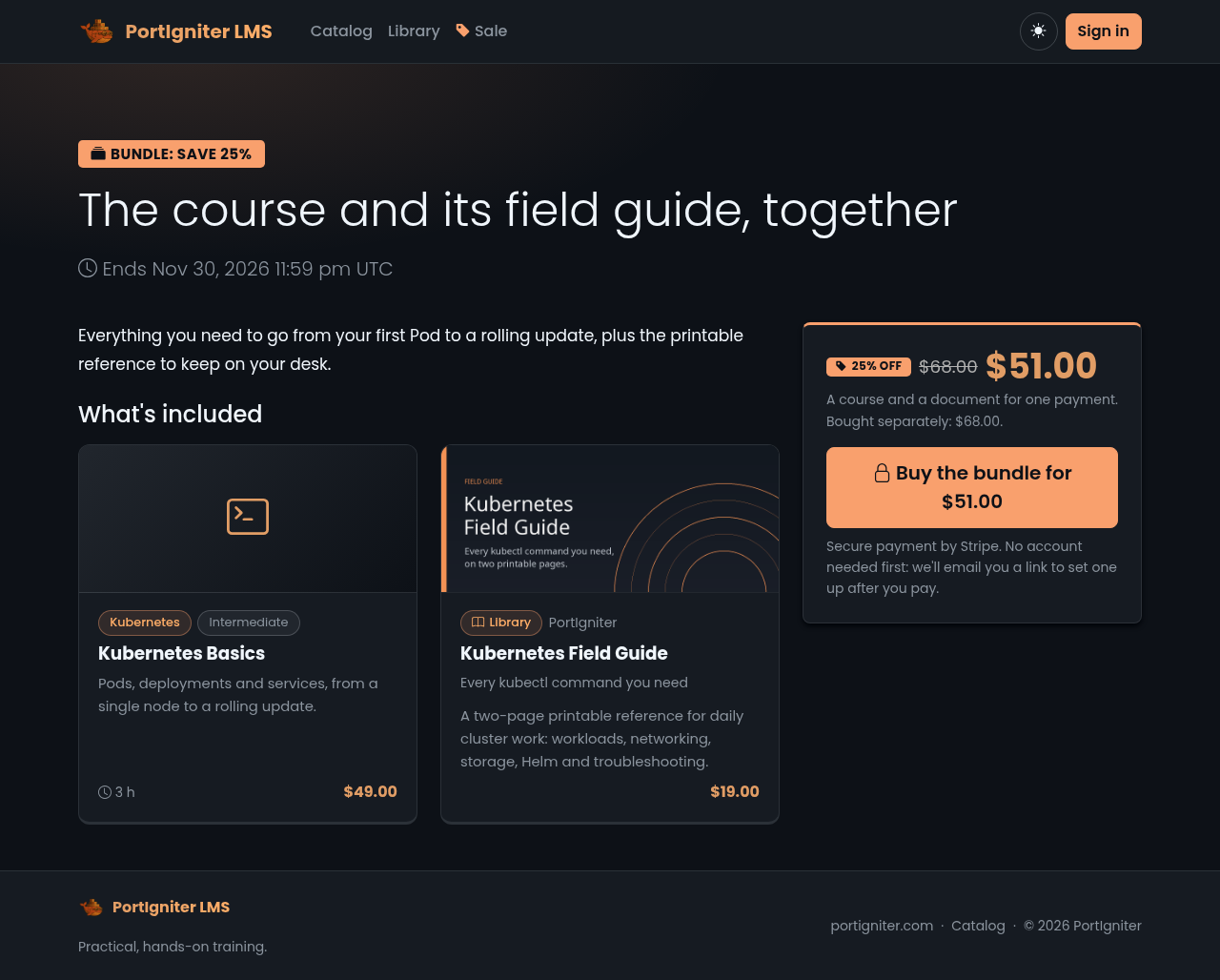
Put a price on any course and learners can buy it through Stripe Checkout. They don't even need an account first; one is created for them when they pay. Prefer recurring revenue? Create membership plans billed monthly or yearly that cover every course, selected tracks, or a hand-picked set, plus the Library documents you choose.
Refunds and disputes sync from Stripe automatically, promotion codes work at checkout, and Admin > Sales shows revenue, refunds, discounts, and estimated MRR, with a CSV export. Payments go straight to your own Stripe account, and card data never touches your server.
Not selling? Leave payments off and enroll people with invitation links and keys, or add them by email or CSV.
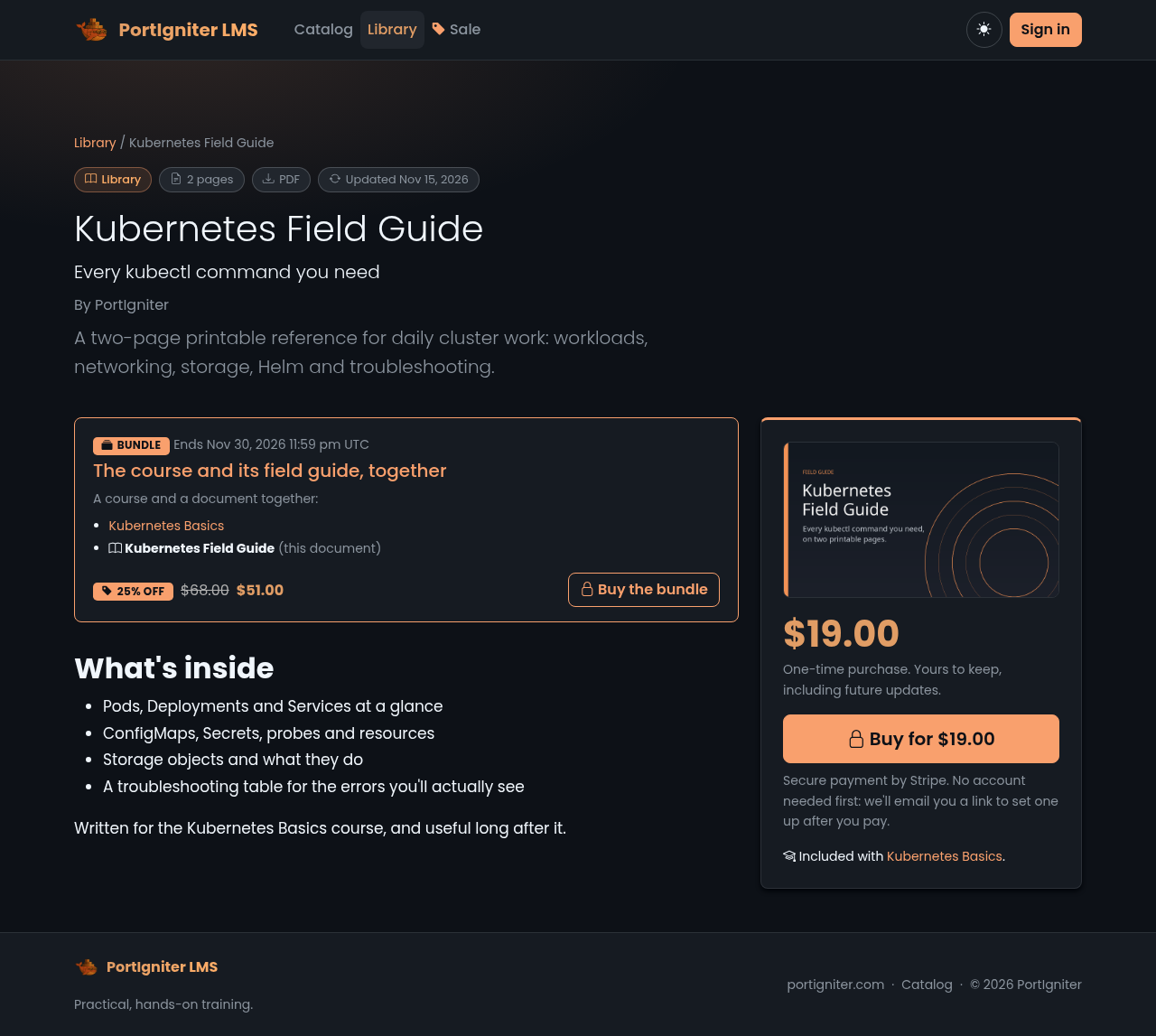
A lot of what technical trainers make isn't a course. It's the lab workbook that goes with the course, the cheat sheet people tape to their monitor, or the troubleshooting guide you wrote after the third time someone asked the same question. The Library sells those right next to your courses, with the same prices, sales, bundles, and memberships.
Add a title, cover, description, and up to ten files: PDF, EPUB, ZIP, Word, Excel, PowerPoint, OpenDocument, or plain text. Published documents get their own Library page, and catalog search finds them too, so someone searching for "Kubernetes" sees your course and your field guide.
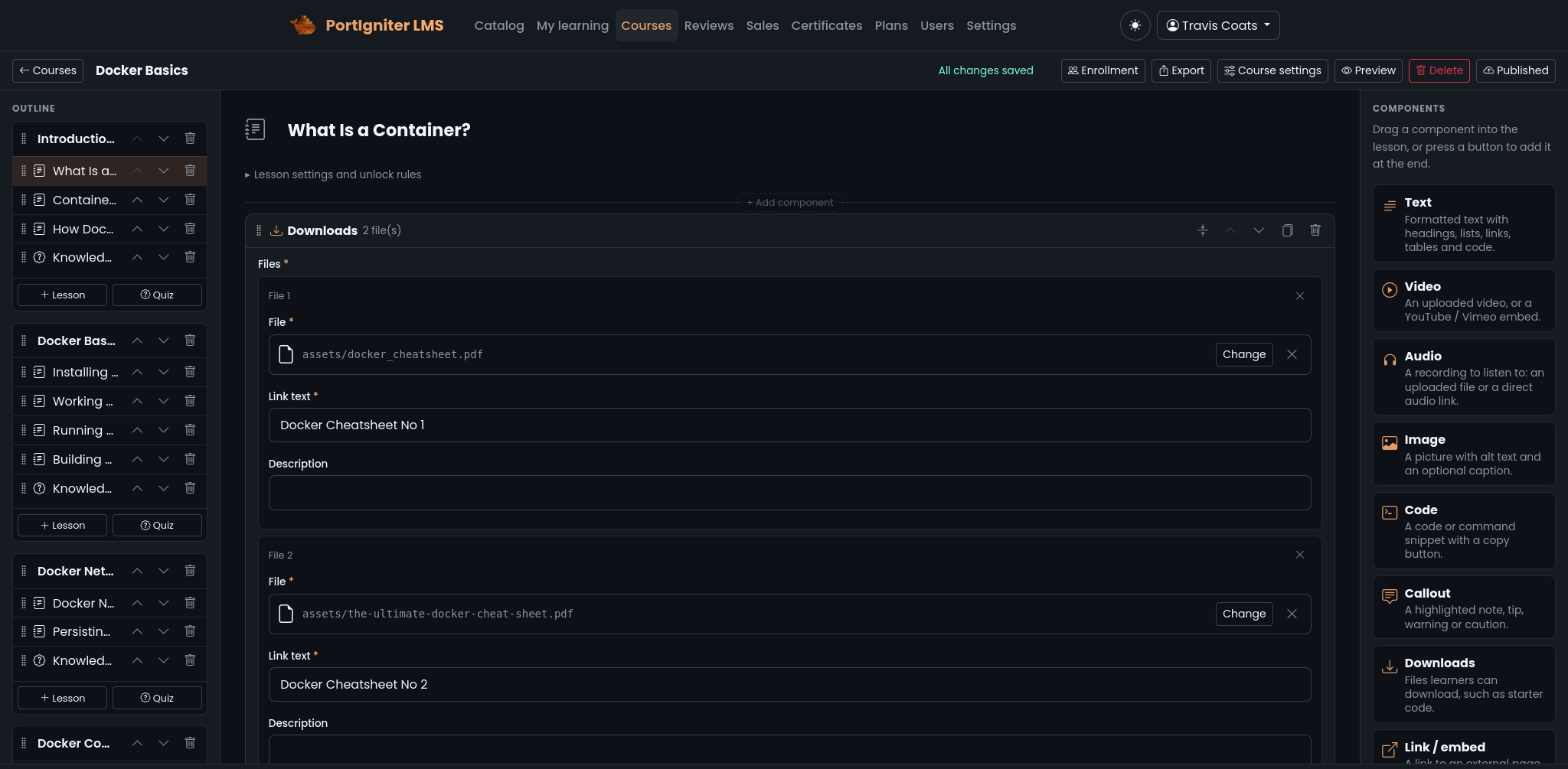
Every course is a folder of plain JSON and Markdown files validated against published schemas. The database is just an index that can be rebuilt from those files at any time. Export any course as a zip, import it on another server, and keep it in version control if you like.
Because the format is documented, you can also write courses outside the LMS. It ships with a course authoring kit that an AI assistant (or a person) can follow to produce an importable course, plus php spark courses:check to validate a package before you upload it.
Reports list every course with its enrollment, learners active in the last 7 and 30 days, completion rate, quiz average, median days to finish, and work waiting for review. Drill into a course roster, where anyone idle for 14 days is flagged as inactive, then into a single learner to see every item, quiz attempt, hand-in, and how much of each video they watched.
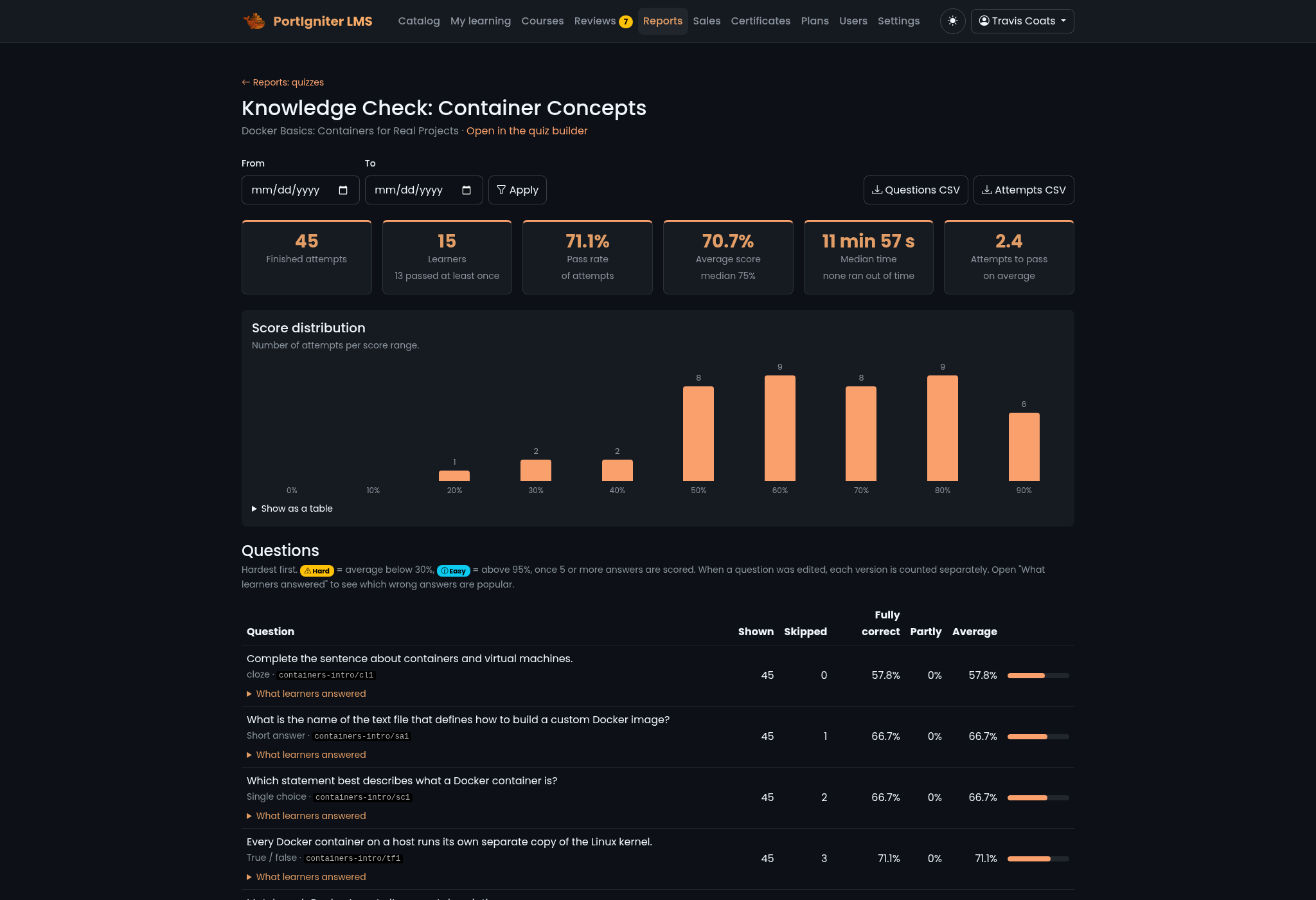
Quiz analytics break each quiz down question by question: how often it was answered correctly, which options people chose, and the most common typed answers. Questions that look too easy or too hard are flagged, which is the quickest way to find a misleading distractor.
Learners who finish a course rate it from 1 to 5 stars. The average shows on the catalog; the comments stay private for your eyes only. Everything exports as CSV, and staff accounts never skew the numbers.
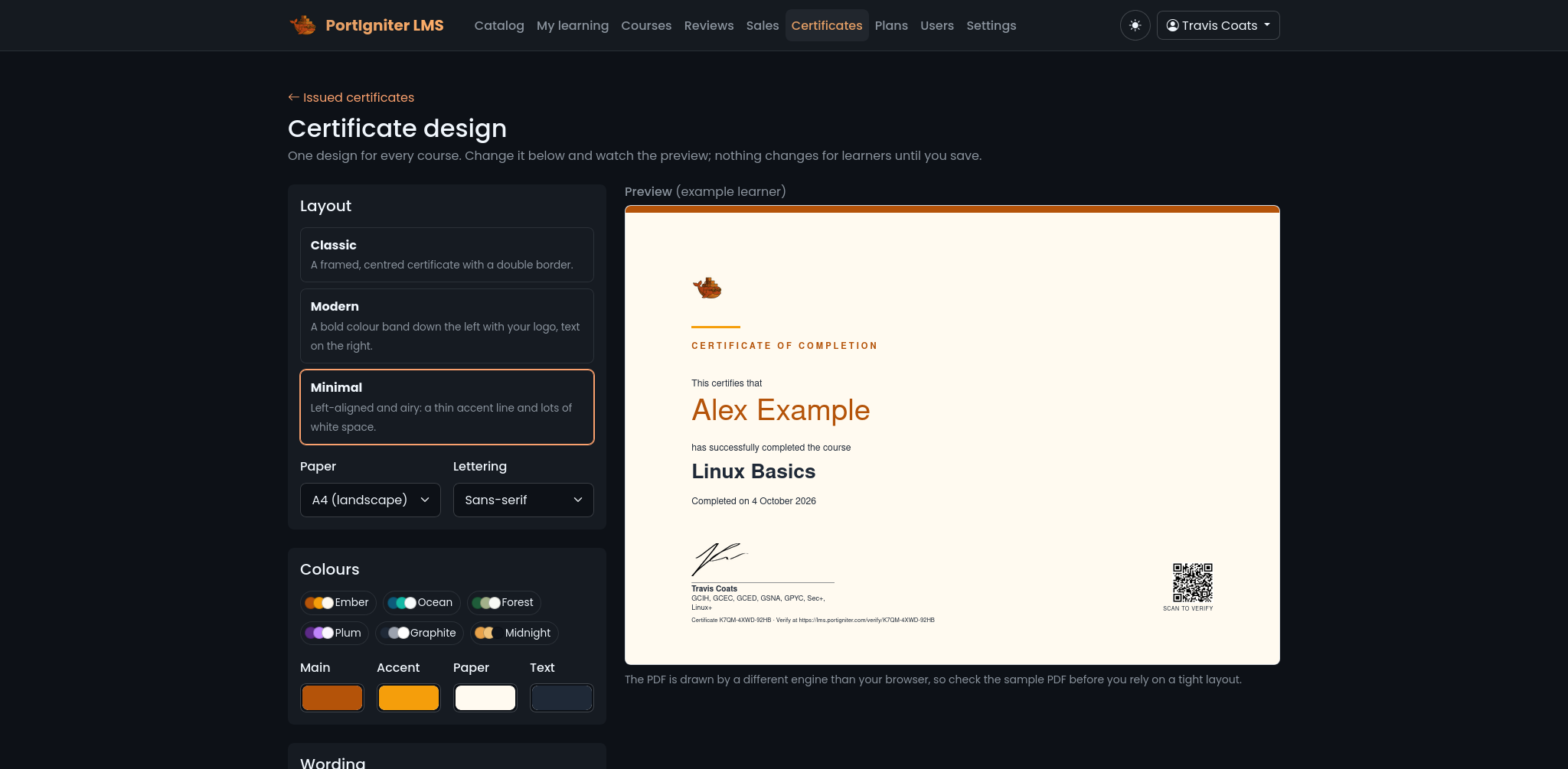
Details are locked in when a certificate is issued, so editing a course later never changes a certificate someone already earned.
Turn on certificates for a course and every learner who finishes gets one automatically, as a PDF they can download from their dashboard. Make it look like yours in the certificate designer. Start from a Classic, Modern or Minimal template, then pick your colors, font, paper size (A4 or Letter), logo, background and signature, and watch a live preview update as you go. The wording is yours too, with placeholders like {student_name}, {course_title}, {hours} and {date} filled in for each learner.
Every certificate carries a unique ID and a QR code that links to a public verification page. An employer can confirm the name, course and completion date without logging in, and no email address is ever shown. Made a mistake? Fix a misspelled name or revoke a certificate from the admin, and the ID and QR code keep working.
Every stylesheet, script, and font is bundled with the app. There are no CDNs, no trackers, and no third-party cookies, so your learners' activity stays on your server. Course videos, audio, and downloads are only served to enrolled learners.
An account only gets a password after its owner clicks an emailed link. Sign-up and password reset never reveal whether an address is registered, logins are throttled, and you can turn self-registration off entirely.
Any user can turn on two-step sign-in with an authenticator app such as Google Authenticator, 1Password, or Aegis, with 10 one-time recovery codes as a backup. A password reset link still asks for the code, so access to someone's mailbox alone isn't enough.
No framework build step and no cloud dependency. Copy the example environment file, fill in the required section, and bring the stack up. The database is created and migrated for you on first start.
| nginx | Web server: serves the site over HTTP and HTTPS |
| php | CodeIgniter 4 on PHP-FPM: the LMS itself |
| scheduler | The same image in a different role: finalizes expired timed tests, runs daily backups, and handles other background work |
| mariadb | The database, never exposed outside the stack |
Courses, uploads, and certificates live on a persistent volume, so they survive upgrades.
# 1. start from the template and fill in
#    the REQUIRED section
cp .env.example .env

# 2. Login to the PortIgniter Registry
docker login registry.portigniter.com

# 3. Start the stack
docker compose up -d

# 4. open the site and sign in as the
#    admin account from your .env
open http://localhost:7080/
Light and dark themes that both meet WCAG AA contrast, your own logo and front-page image, home page feature tiles you edit from the admin, plus custom CSS and head or footer code.
Point it at any SMTP server for account links, purchase receipts, enrollment notices, and certificates, all in branded templates that match the site.
One zip holds the whole database and every course, upload, and certificate. Back up from Admin > Backups or on a daily schedule, and restore with one command.
Database, site address, email, and Stripe keys all live in one .env file. There is nothing you need to edit inside the container.
PortIgniter LMS is licensed per year and includes regular updates with new features, new question and block types, and improvements across the platform. There are no per-learner or per-course fees: one license covers your whole deployment. Since it's licensed under the MIT license, you can opt not to renew and still use the software indefinitely. Buy a license below, or get in touch to talk through a deployment for your environment.

A Docker Compose deployment for trainers and small teams who want to get up and running fast. No limits on installations, courses, learners, or instructors!
| License $100/year | |
| MIT License | |
| Unlimited Learners & Courses | |
| Stripe Sales & Memberships | |
| Library, Bundles & Scheduled Sales | |
| Docker Compose deployment |